

Intro and Musings
I have long had a love/hate relationship with Ubiquiti. While I hold them as one of the best solutions in the prosumer/SMB market, personally I would never use them in Enterprise. They have a long, frustrating history in which every new hardware release is a public beta, and new code trains are a complete train wreck.
That being said, I quite like the Unifi Controller software, and I think it does an admirable job running my APs. Very full featured, dare I say even…”neat.” I first ran it on a (shudder) Windows server, then on a LXC, and now in a docker container. Progress! The APs, while mostly solid have also been victim to the bad software release quality.
Some innocence was lost, I think when after an update and implementing MPSK to consolidate my SSIDs. Then it just decided to randomly drop traffic off into different vlans. Because, that’s what I want my solution to do, the opposite of what it’s asked.
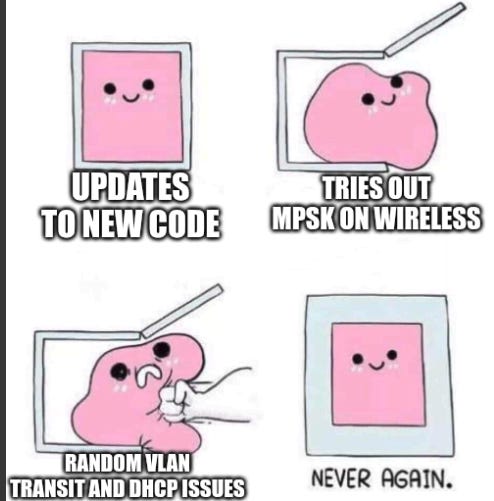
But, this section isn’t really about that. What inspires me to write a new article is something I think that’s really neat, or something that tripped me up and frustrated me. I’ll share those experiences in the hope of helping others, while at the same time venting in free tele-therapy. ;)
Fetch Me A Switch
While my fellow Gen-Xers and I work through the shared trauma of that title, lately I decided I wanted to buy a new switch. And I figured I’d give Ubiquiti a shot. I decided on the USW Pro Max 48 PoE. The specs are great. A bunch of 2.5Gb ports, PO+ and POE++ on the 2.5 ports, and four 10Gb modules. Just what I was looking for. It can also do L3, but I got it purely for L2 use. I don’t want the other bits and bobs you need for a “unified” solution thank you very much. OPNsense FTW.
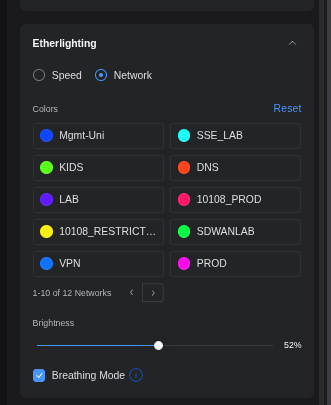
I also really liked the idea of managing it in the Unifi Controller, especially because the mobile app is really well thought out. They also have this feature called “Etherlighting” which turns the front into a RGB wonderland. It’s quite a useful gimmick, in my opinion. You can have the ports light up different colors for speed, or for vlans. They even have a locate feature which makes the port you’re looking for glow bright white. I lowkey love it.
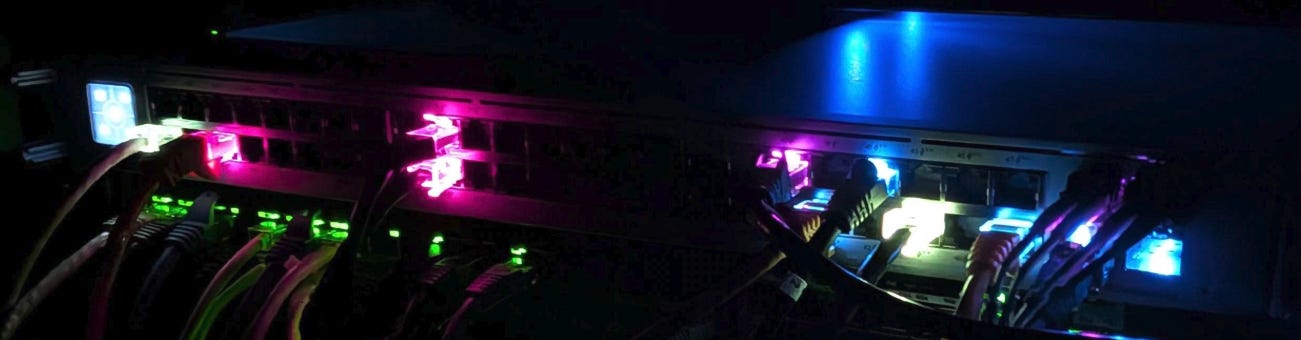
The AR feature of the app is kinda nifty too.

So I unbox it, rack it up and connect it to my current switch. As I don’t want to perform a hard cutover, and moving things gradually is my usual MO, a trunk is what’s required. So I start off with an access port, get the thing on-boarded, and that’s where my trouble began.
Note: if you’ve been working with Ubiquiti gear for a while, this may seem like common sense. This is about what might trip someone up after a lifetime in CLI on Enterprise gear.
Trunking Ridiculous
Ok, so let’s start off with…maybe I should RTFM’ed, sure. I’ve been doing this for a while though and the conventional knowledge for this kind of operation is console in, set the mgmt IP on the SVI of your choosing, set trunk allowed all with a native vlan of 1 on both sides. Or, if you’re using something that tags/untags do that. Pretty basic stuff. If you screw up, it’s trivial to break out the ol’ console cable and figure it out.
SSH in, and get going.
This was NOT my experience. Way more nuance here. A couple things.
Keep a paperclip handy. There is no console port, no safety net. You screw this up and lock yourself out, you’ll be factory resetting it.
Don’t lean forward and configure everything. Wait until you’re sure you’re all set.
Once you factory reset, the certificate on the device changes. So you’ll have to remove it from the controller. Once you do that, the config cannot be restored. You have to start over. The “use mac to replace” is only for gear that has already been on-boarded.
Once the IP is set by DHCP initially, the SSH user name/password is usually “ubnt”
If the controller isn’t picking up the device you can SSH in and run:
set-inform http://[IP]:8080/informThis will force registration to be adopted.EVERY SWITCH PORT IS A TRUNK BY DEFAULT. It’s opt-out which is mind-boggedly insipid.
Before you upgrade code go to the forums. More often that not there’s horrific bugs about real basic stuff. E.G. in 7.2 there’s a bug in which new vlans won’t pass traffic. Come on, you have ONE job, people.
TURN OFF AUTO UPDATES!!!! You’ll thank me later.
Ok, here’s what tripped me up. On the IP settings, you’ll see this by default
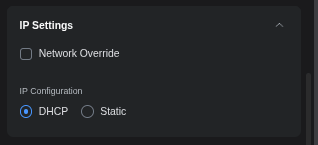
Clicking on it, presents a warning followed by a list of configured vlans to choose from.
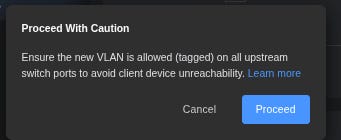
And I found that link to be incredibly useless. It didn’t explain that part at all in my opinion. Plus, I see the word “magic” in a document and I check right out. “Network Override” Meh. So let’s talk about it. With it unchecked, that’s basically the the SVI of VLAN1. So when I connect that to vlan 777 on the opposite switch who cares, we aren’t tagging at that point. Connections for days.
I misinterpreted that to be the DEFAULT VLAN for a trunk. Yea that’s not right at all. “Network Override” changes the vlan the SVI is tied to. Le Sigh.
So next, we need to go to the uplink port in the UI. To add to the confusion a bit, vlan1 has an SVI that you can’t turn off or remove. I can see the use case perhaps and maybe you can use it to SSH? I’ll be honest I did not try.
Now native vlan/network is doing double duty here. Instead of being separate commands like we’re used to, all ports are a trunk, with the native vlan acting as the untagged access. Thanks, I hate it. Perfect for the trunk, terrible for regular access as a standard.
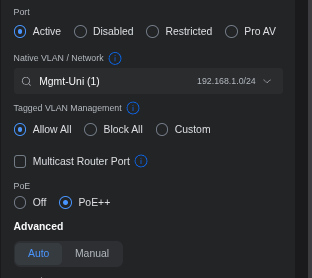
When I want it to be regular access port, the phrasing here is also confusing. “Block All” isn’t blocking traffic persay it just means drop tagged traffic. Only allow untagged traffic like a friggin access port. (sorry some anger came through just then)
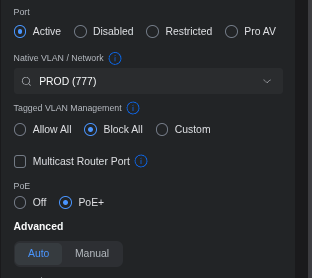
For something like an AP, i think it does make logical sense.
(I did rename vlan1 since it’s also named “mgmt” by default)
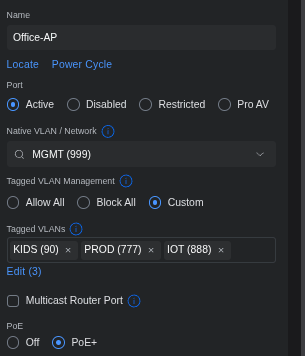
At the end of the day, all I had to do was set my IP, change the Override to the right vlan, and change the other side to the typical allow all/vlan 1 scheme.
Instead what I did was throw a totally undignified babyfit, invent new combinations of swear words and start a return process until I calmed down and figured it out. This is sometimes my process.
Conclusion
Ok with all said and done, after these issues I am happy so far with the switch and APs. I have negative interest in going further into the ecosystem, but for AP and L2 switching so far I like it a lot.
It really comes down to both code and hardware quality at the end of the day. Ubiquiti seems to be just barely functional with new gear/code most times, but for the stuff that’s established, as long as you know what to do and what to research I think you’ll be ok. The forums are an excellent place to start, and Claude/Gemini is a good way to get a summary of issues with code, and what’s the most stable.
Just keep it out of the Enterprise. There be dragons.
Until next time.