

Intro and Musings
I’m now in the SASE/SSE space, but my career history started with System Administration and then went to networking. So I naturally acquired lots of experience with Windows and Active Directory. Honestly, I was aware of the two main authentication methods, Kerberos and NTLM but because it just “worked” a deeper dive wasn’t the topic of the day. A machine joined the domain, a shared secret was established between the endpoint and AD, then Kerberos tickets could be shared with NTLM as a failback.
Onsite failures with this process were very rare, and often were caused by an endpoint having a losing trust with AD, and re-joining would fix it. Failures of Kerberos while on legacy VPN were far more common, but “NTLM fallback” would mask these failures since communication to resources weren’t typically affected. Visibility was also a major pain as we didn’t have the tools we have today.
Legacy VPN firewall rules (and I saw this everywhere) tended to be fairly loose when it came to DCs and their policy. Some just allowed a /32 to the servers, and some allowed some ports, not others, or too many. Moving to a “Zero Trust Architecture” and Entra Only Machines have really brought these concepts back to the forefront and this deepish-dive analysis is what we’ll focus on today.
NTLM (New Technology LAN Manager)
There’s plenty of resources that will go in depth about this, so we’ll just cover the basics.
No tickets involved
Uses the locally stored hash derived from the user’s password to authenticate
Requires authentication for every access attempt (lots of challenge-response handshakes over the wire)
Currently at V2, in a never ending state of feature deprecation
Local hash is static, does not change until the password changes. Big security implications there.
No mutual authentication — the client cannot verify the server is legitimate.
DNS resolution for domain services not required
No dedicated port
We’ll stop there, but none of that seems great, does it? Probably why Kerberos replaced it as the default way back in 2000. So why is NTLM still around? The usual suspects, mainly backward compatibility for apps that simply don’t support Kerberos.
Kerberos
(AKA The Goodest Boy in Hades)
So let’s discuss Kerberos in comparison.
Ticket based, requires successful exchange
DNS resolution required for service records
Dedicated port TCP/UDP port 88
Tickets are time based and expire after 10 hours, renewable up to 7 days by default
Time skew must not exceed five minutes from AD.
Just minutes, hours do not matter. You may have noticed the wrong time zone doesn’t affect Kerberos. Time is UTC behind the curtain.User hash is used only during the ticket granting process. So that’s once per login, not on every access.
Can delegate auth for other services
A better and secure solution. Let’s take some packet captures!
Down To The Wire
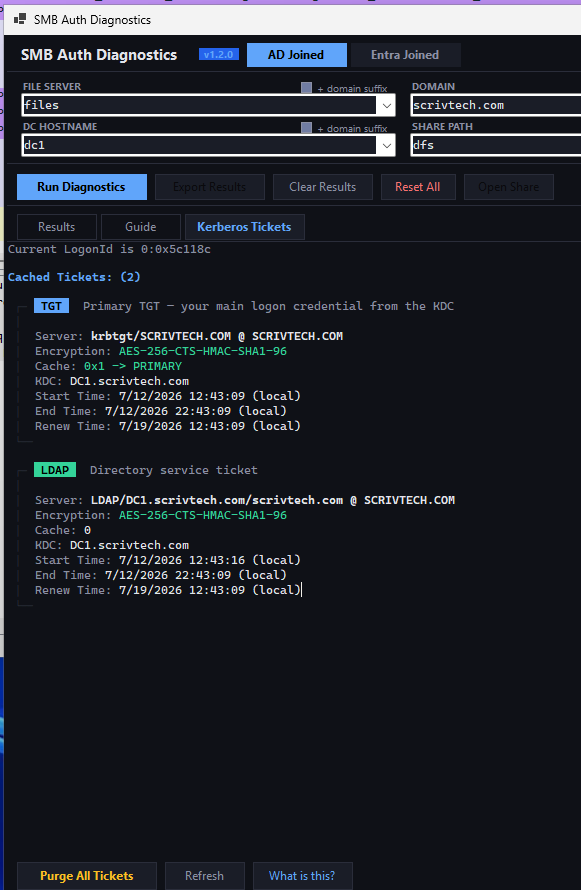
There’s two important commands we can run here. Klist and klist purge. One to display tickets, and to delete them to force refresh. I vibed together a SMB-Diag app, because troubleshooting this can be tedious, so now I have a tool to make it easier and more readable.
Before doing anything, we can see I already have two tickets. The primary TGT “Ticket Granting Ticket” and the ticket used for AD auth. I’m going start a capture, then purge them.
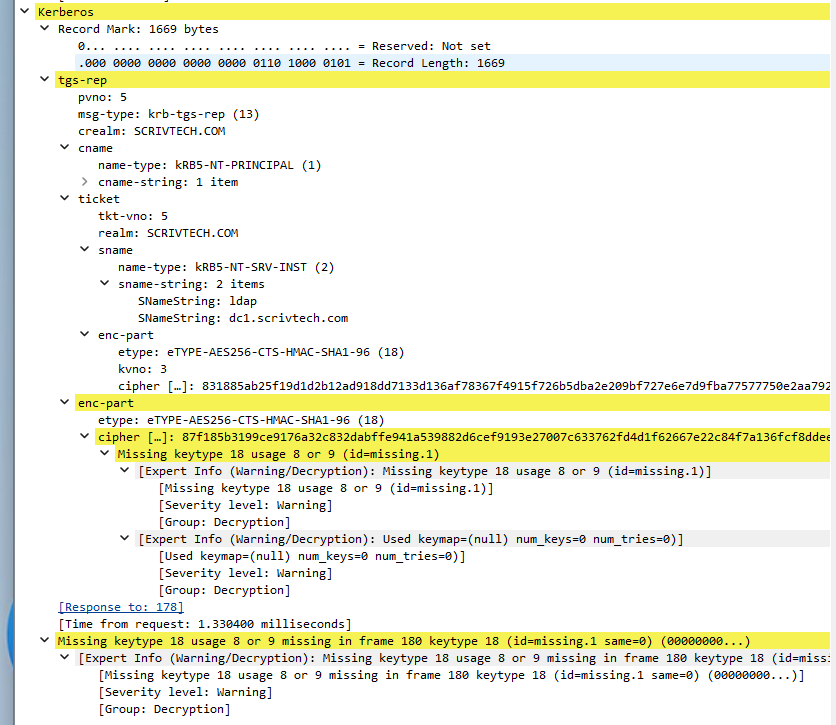
So here’s the conversation for that first ticket. (ignore the yellow in the responses)

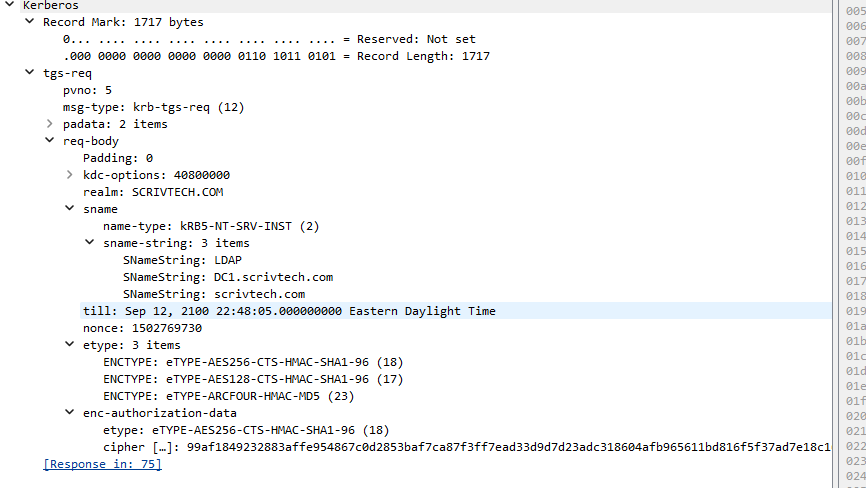
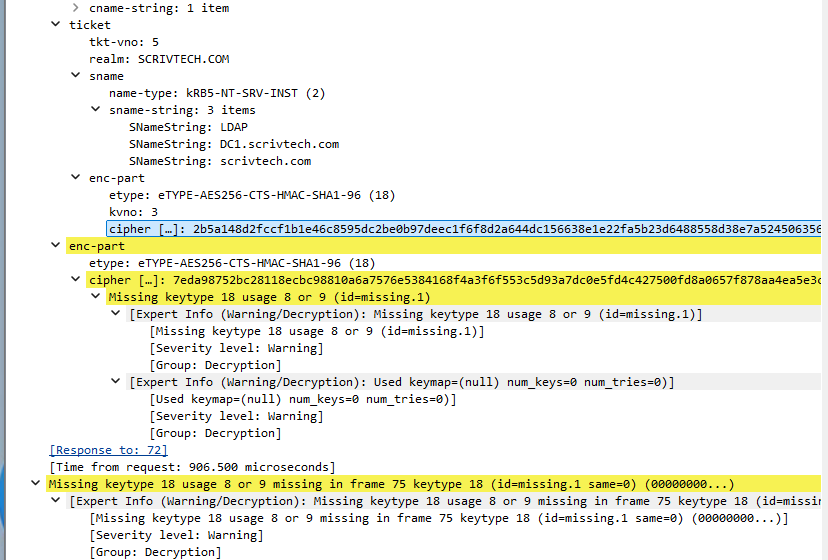
And the conversation for the second one.

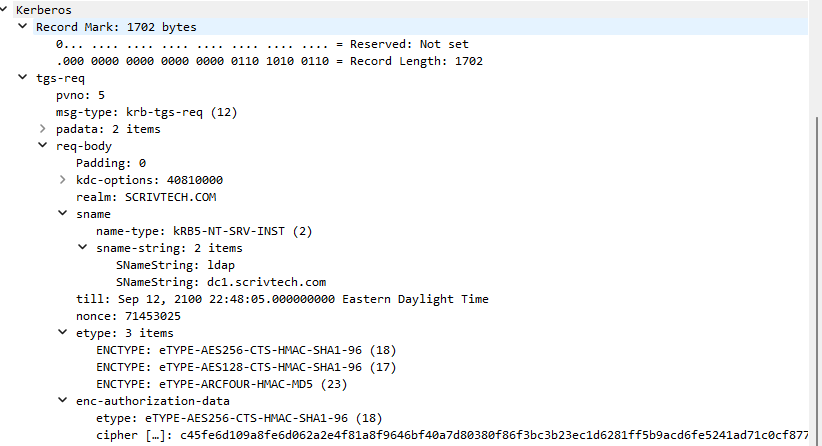
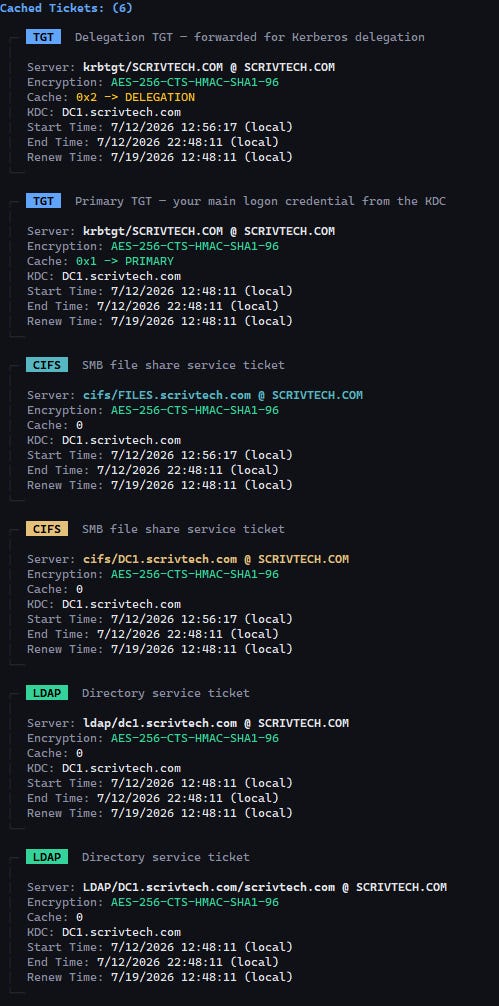
Ok now let’s access a share. Many more tickets! One for each server/resource. We will use these tickets until the lifetime expires/purged/logon event.
Now, when accessing the share we can see where SMB gets involved.

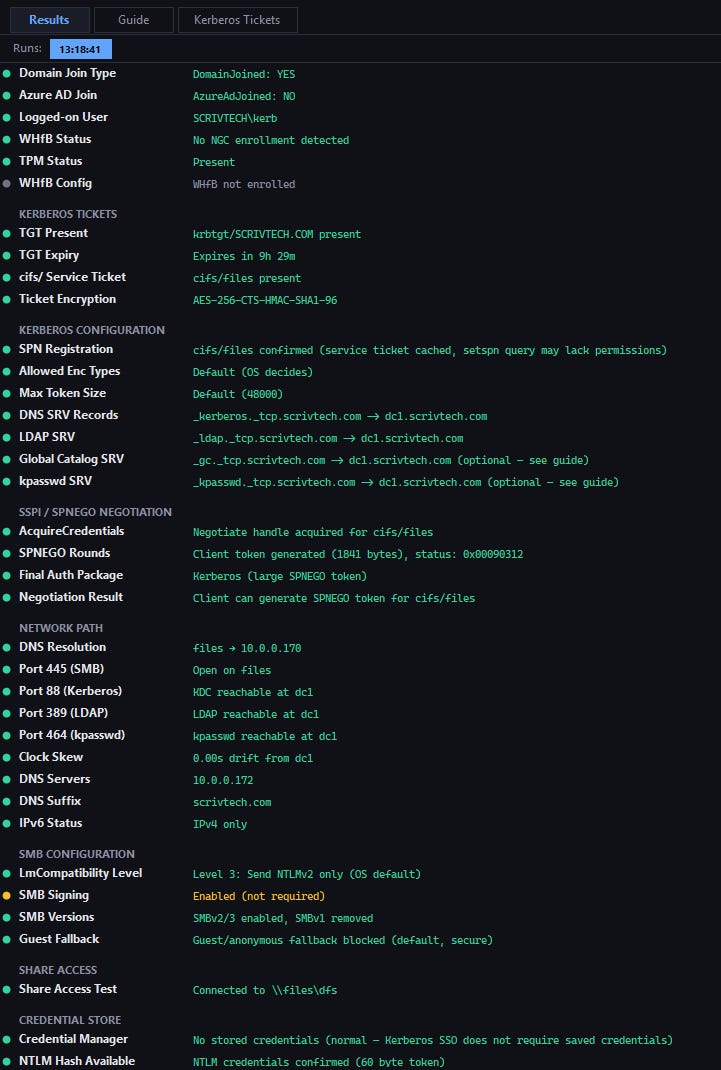
Let’s take a look at the overall diag output to see what’s needed. The srv record for Kerberos/LDAP is especially important, and it cannot be resolved by IP.
Now, let’s block DNS/port 88 and see what happens. I also purged tickets beforehand.
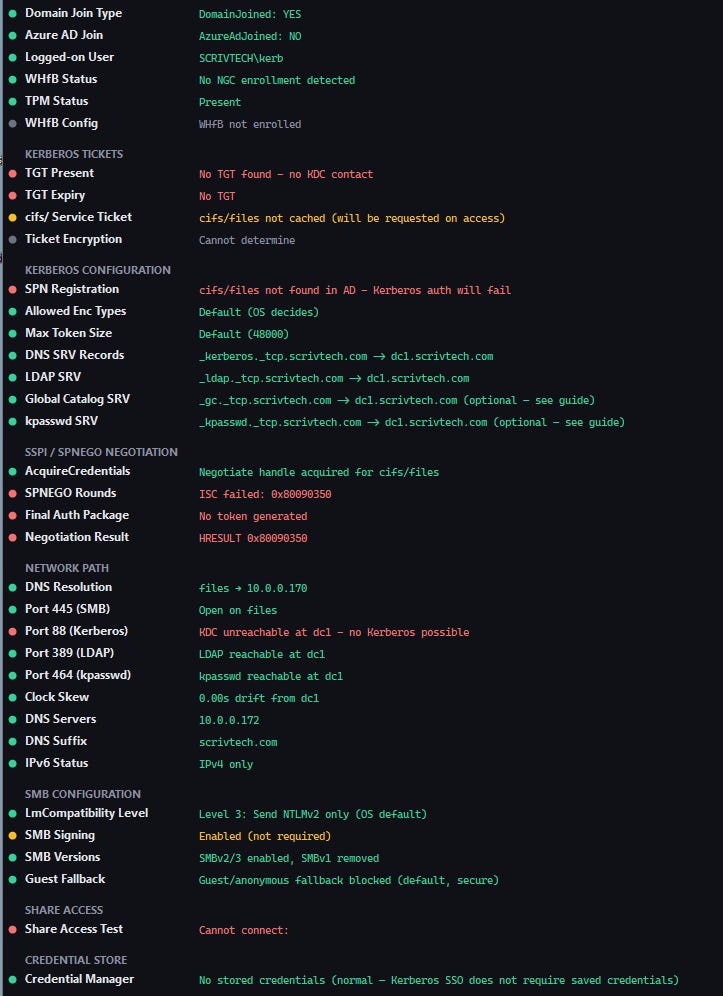
Now this was interesting and I expected a silent fallback, but received a password prompt instead. I entered the user’s password and then saw the NTLM flow, with no Kerberos captured.

I removed the blocks, and where I did get a silent NTLM fallback is when I accessed the share by IP and not FQDN. As I mentioned earlier, Kerberos requires DNS for not just the SRV record, but share names as well. Great finding, and something I overlooked.

Entra The Dragon
Now let’s talk about Entra only joined machines, and let’s be super specific here. A machine that is is domain joined and has a user that that is also replicated up to Entra for IDP/Application access is no different than the situation we just went over.
The machine/user are both fully a member of the domain. Kerberos, NTLM, that all still applies.
Entra only machines where you sign into to the Entra Tenant at OOBE, is an entirely different situation. The user may be an AD object, but the machine actually never joins the domain, and therefore cannot exchange tickets with AD. To effect, the user has no NTLM hash to fall back on whatsoever. This is purely a Kerberos environment.*
*See: “Challenging Assumptions” at the end for a correction here.
Paradoxically, an AD user on an Entra Only machine CAN access shares when in line of sight to AD, or when connected via ZTNA/VPN.
The way this works is that when the user signs in for the first time, Windows Hello For Business forces the creation of a PIN or Biometrics, or both. It then uses the local TPM to create an independent asymmetric key pair. After that the password is irrelevant for login and and after a successful PIN/Biometric login the private key is unlocked for authentication.
Entra/On Prem AD use a “Cloud Kerberos Trust” connection to facilitate trust for AD based resource access.
When a user signs into a device that’s registered with Entra — whether Entra-joined, hybrid-joined, or just Entra-registered — the device obtains a PRT (Primary Refresh Token) from Entra ID. This token proves the user has completed primary authentication to the cloud identity provider. The client can take the PRT, and ask Entra for a “partial TGT” which is then used by the client to send to AD for proper access to on-prem resources, by way of exchanging for a full TGT. AD will accept the partial TGT signed by Entra as a bootstrap to kickstart traditional Kerberos communications. The Cloud Kerberos Trust is not setup by default, and must be configured in AD.
The SMB-DIAG tool will auto-detect the type of machine and show the relevant results.
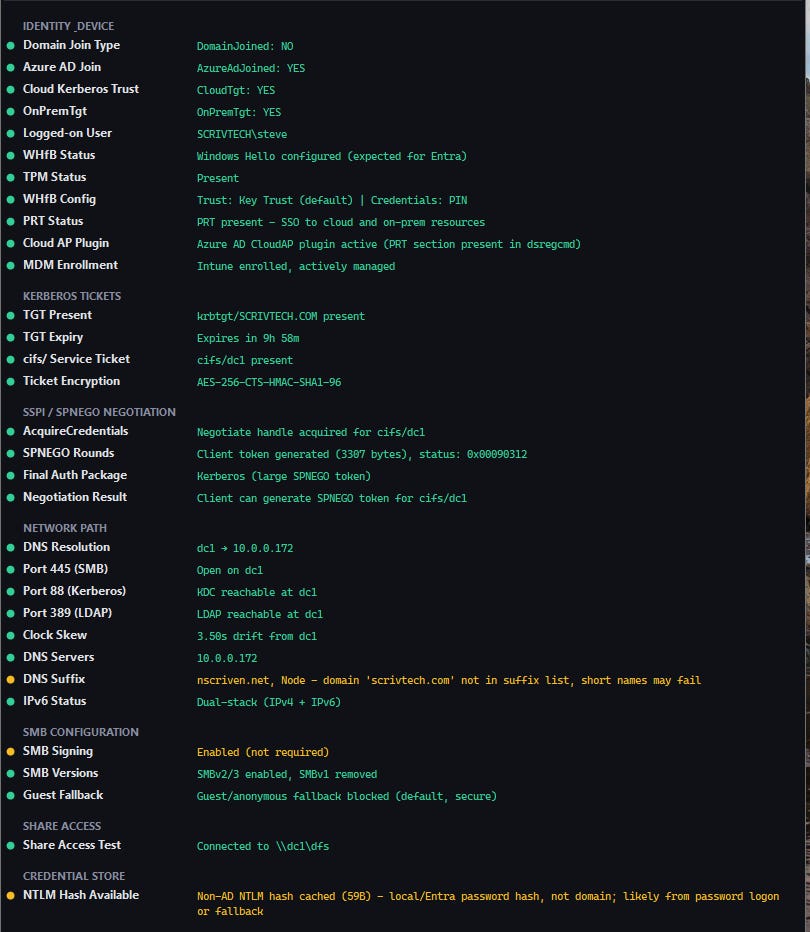
You cannot easily see the PRT (Primary Refresh Token) in CLI so I had the tool pull it for easier troubleshooting.
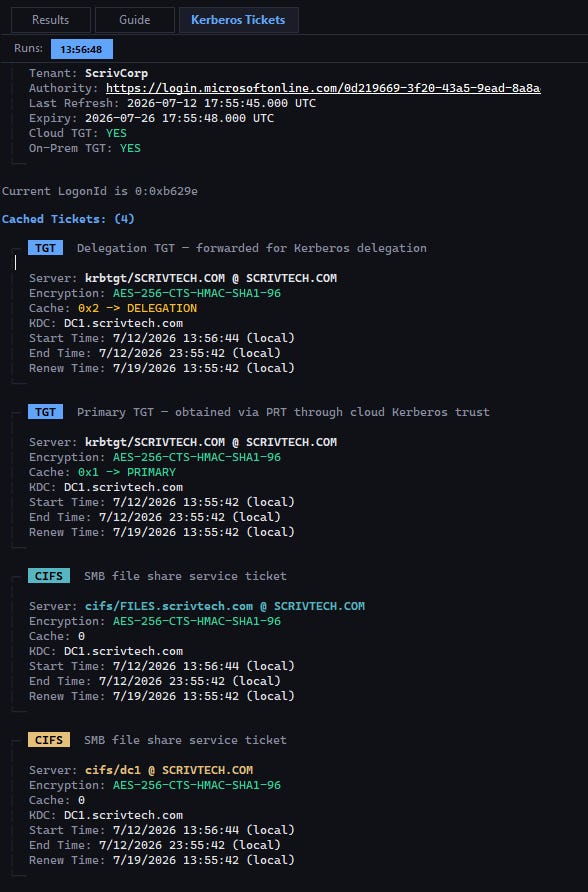
Challenging Assumptions
One of the main reasons for this blog as I’ve stated in the past is that it forces me to sit still, think more critically and challenge my confirmation biases. When I’m in my normal workflow and just flying along I lose some nuance in the noise. I just encountered a flaw in my Entra NTLM assumption, which bears mentioning.
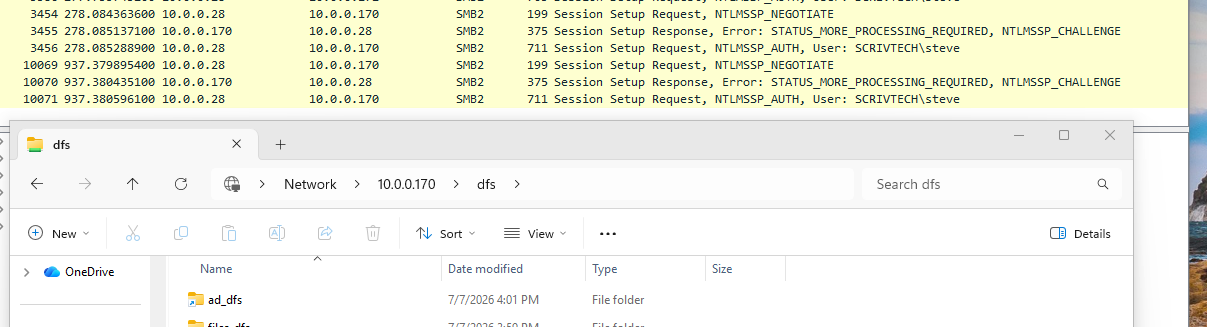
So, when I signed onto the Entra machine initially, what did I use? My AD password. And what did that do? Created a hash, of course. Because (sigh) of course it did. As this is a lab and not a true production environment I did not set up a process like a Group Policy/Credential Guard, etc.
An actual Production level environment that wants to be as password-less as possible would likely have other mechanisms to prevent the hash from being cached for use. Such mechanisms like SCRIL for hash randomization, and daily hash rotation via fine-grained password policy to start.
Conclusion
So I think we’ll end here, and hopefully you found this whole exercise as useful as I did. From Entra to the “Atomic” policies of ZTNA that can expose requirements for communication for secure access in a way that perhaps we didn’t have to think about in the past, a review and testing of previously held assumptions is never a bad thing.
One thing that stood out to me is how using IPs to access resources instead of FQDN represents a real weakness in a way I never really considered. Hardcoded IPs in scripts, printer configs, monitoring tools, etc can be a path to insecure access that wasn’t planned for if you were expecting proper Kerberos methods.
I’ll tell you one last thing. Visibility is key to be able to effectively troubleshoot and challenge what we think is happening. I have used AI to build tools for situations such as these where no real formal tool exists for my needs.
If I had to ask someone to build this for me, they’d pour sugar in my gas tank after a day. And I think we’d experience the heat death of the universe before I was able to do it myself.
SMB-DIAG can be found here:
https://github.com/darthrater78/smb-diag
I’m a big believer in trying to vibe as transparently and safely as possible, and the skills I use to assist my efforts are here:
https://github.com/darthrater78/claude-vibe-skills
Until next time.