

Intro and Musings
So in Part 3, I discussed adding a secondary IP to allow a service to exist on the same Docker host, with the same port. And hey, that worked great. Up until it had to cross my firewall zone. This was fun (haha), so let’s discuss it.
Zoning Out
Ok, so let’s say we’re on the same L2 network and trying access WUD as in the previous article’s example on the secondary IP.
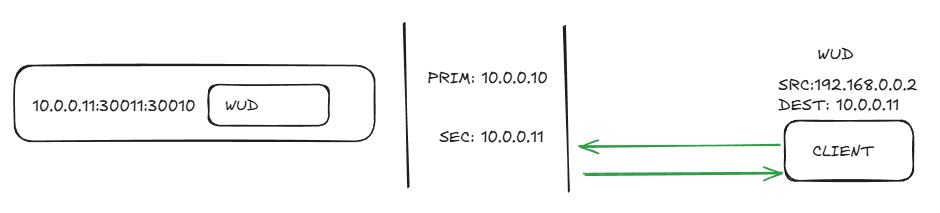
No issue. Life is good. But, when we want to cross vlans across a firewall zone, say from DMZ to Prod, things go sideways. With a secondary IP, we share the default host bridge, so any inter vlan traffic needs to out the primary IP, (where the default gateway is) where it NATs and then presents traffic that doesn’t match the source session, which gets dropped/blackholed.
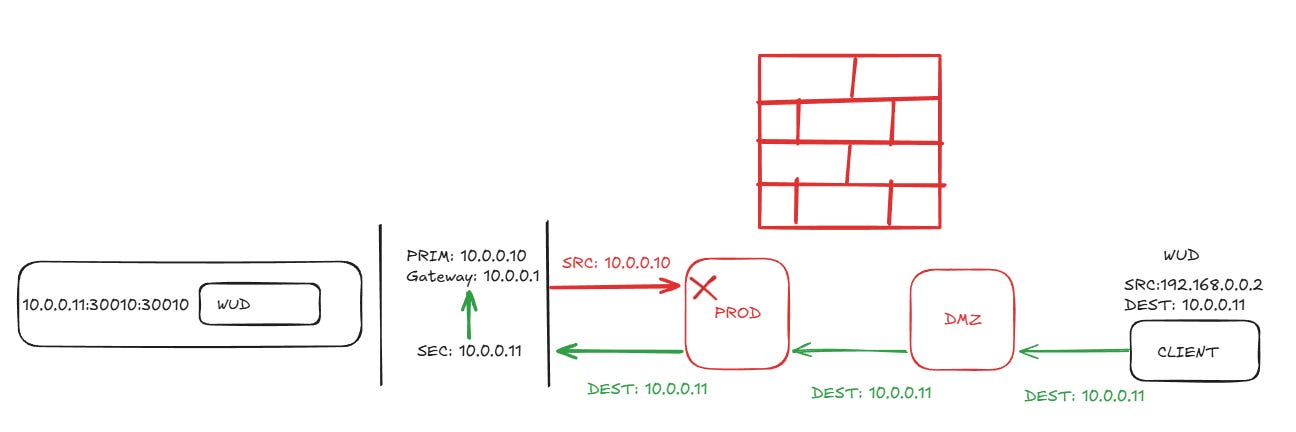
Driving To A Solution
Docker networking is intensely interesting. There’s a solution here, and that’s using a different network driver. There’s several, but we will cover three.
bridge: default, secondary IPs configured on the host. Issues on the intervlan/firewall flows as shown above.
macvlan: this driver will actually act a separate interface in docker and give the clients in the network their own mac addresses. Requires your hypervisor support promiscuous mode for the extra macs coming from one port. This fixes our traffic issue.
ipvlan: this driver will actually act a separate interface in docker and will use the same mac address as the parent interfaace. A good alternative since its the same mac coming out of the port. This also fixes our traffic issue.
With both ip and mac vlans, the network is defined on the stack/compose and not on the host interface. It’s only active when the container that has the network configured is up.
Driving Into a Brick Wall
So great, right? Let’s configure the ip/mac vlan and go about our day. Not so fast. There is a huge caveat we need to cover. A better name for this feature is mac/ip vrf.
When a container is configured with the vlan option, it cannot talk to any other container on the same host. So if you’re you’re using a proxy that talks to other containers on the same host, it’s not going to work. Traffic leaving the host is unaffected. Also unaffected are any tools that monitor docker socket.
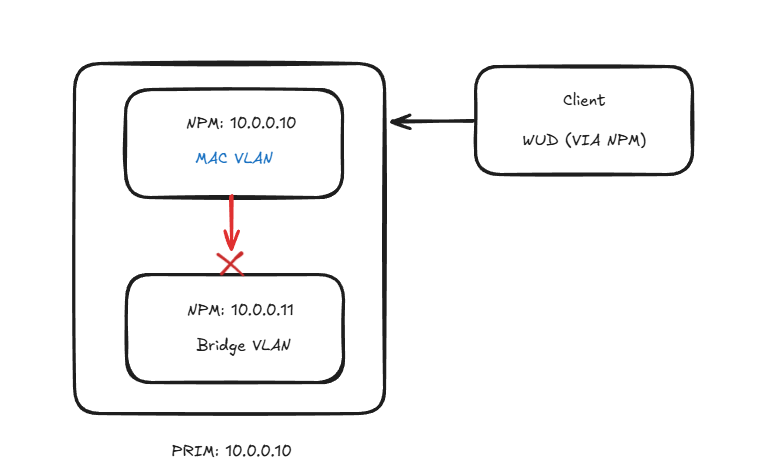
So my situation was that I have a proxy in my DMZ and a Cloudflare tunnel. I need NPM to use a vlan driver but I also need to be able to talk to the CF container as well. Luckily there is a solution. We’ll use the same driver for each.
Configuration
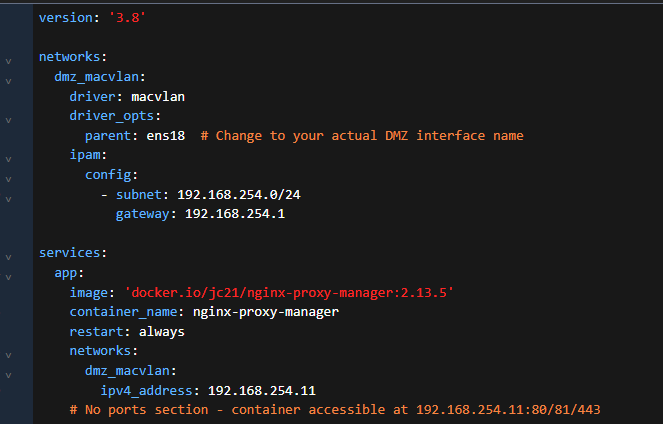
OK, the driver config can only be on one container. Let’s see what that looks like.
Notice that even though we’re using a parent interface, we get our own default gateway for this traffic. This allows us to not have to NAT out the bridge driver. We can use the same network as our parent, just make sure the IPs are unique on the network.
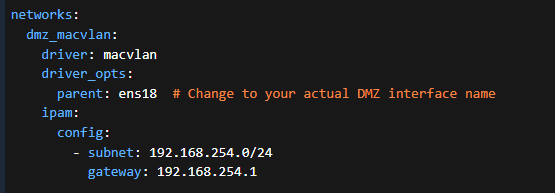
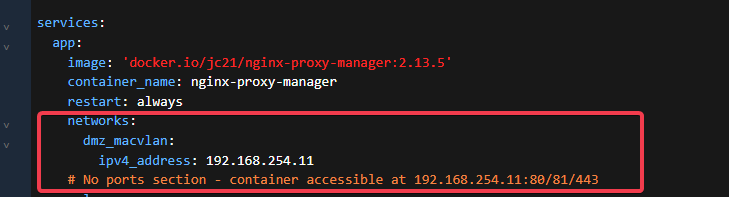
Once the network/gateway is configured now we actually set the IP under the service section. Once this is deployed, you should be able to ping that new address. As the note says there are no ports to expose, it’s all open.
Here’s what it looks like together.
NOTE: volumes and other settings are not in the examples
Sharing The Love
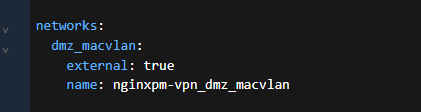
Ok, let’s add our other container. We set the network, but as external and we map to the name of the vlan network.
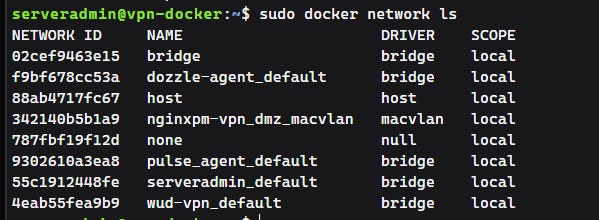
Look in Portainer networks or via sudo docker network ls
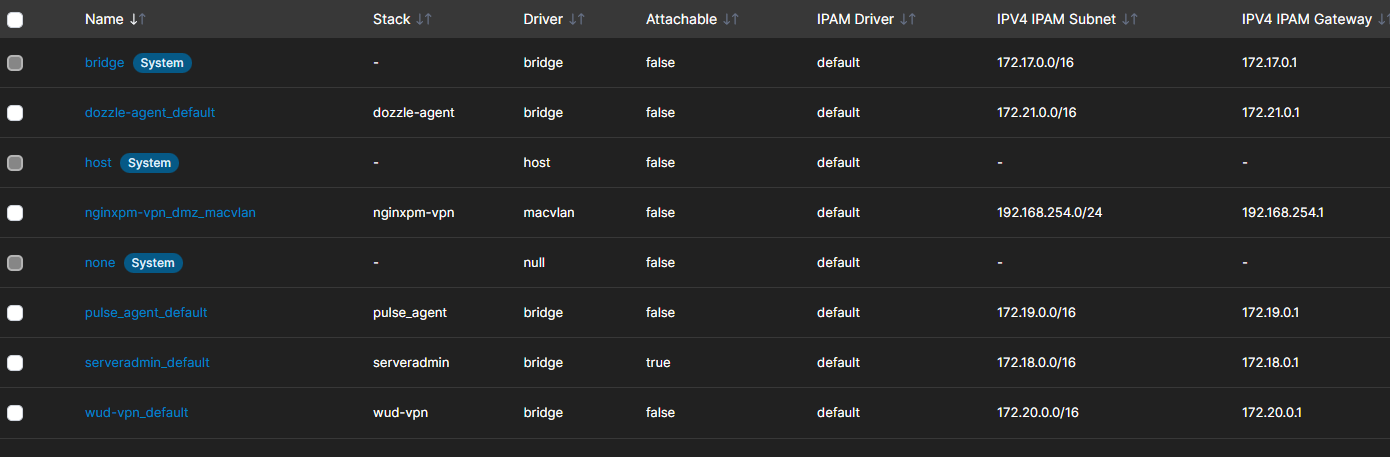
Then under the service we define the IP of the container.
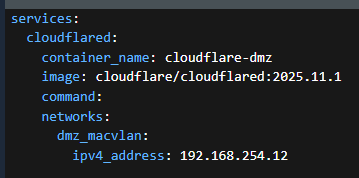
Lather, rinse, repeat for any other containers that you need to talk to each other. If you want/need to use ipvlan instead simply use “ipvlan” as the driver. The documentation suggests ipvlan is the better way to go as well. But for home enterprise? macvlan is fine provided your hypervisor supports promiscuous mode on the vswitch.
Proxmox seems to have it enabled by default.
ip -details link:

There’s also other drivers, where you can tag traffic, L3 IPVLAN, etc. That’s way out of scope for my use case, so but there’s extensive documentation here.
Conclusion
Well, this was a journey well worth taking. The vlan bridge drivers are really useful when homing the same services with the same port on the same host. But the use case needs to carefully planned for, due to the natural isolation between drivers. But there’s a use case for mac/ip vlan, secondary IPs on the bridge driver, it’s up to you.
The flexibility of what Docker gives us is what makes the application so useful.
Until next time.
The NAT issue you hit with the bridge driver crossing vlans is exactly the kind of gotcha that makes people think networking is dark magic. Calling macvlan/ipvlan a "vrf" is spot on though, that isolation between containers on the same host catches a lot of folks off guard. Good call on the external network trick for sharing the driver config.